
Binance to Bybit USDT Transfer: The Fee on Every Route
TRC20 is the most expensive way to move USDT out of Binance, not the cheapest — and Binance's own withdrawal note says so. The fourteen routes Bybit actually credits, what each costs to send, the five chains that would swallow the money, the account-side locks that stop a transfer before it starts, and what recovery really costs when it goes wrong.
Moving USDT from Binance to Bybit costs whatever one dropdown decides it costs. The chain you select on the withdrawal screen sets the charge, and the gap between the cheapest and the dearest option Binance offers for USDT is 150x.
Most pages on this route recommend Tron (TRC20) out of habit. In Binance's published network data for USDT, read on 19 August 2026, Tron is the most expensive of the nineteen networks it will send USDT on, at 1.5 USDT per withdrawal. BNB Smart Chain (BEP20) is the cheapest, at 0.01 USDT. Bybit credits a USDT deposit on both.
Binance is not hiding this. Attached to its own Tron entry for USDT is the note: "Note: USDT withdrawals on BSC are now on the lowest fees!" The exchange steers people off TRC20 at the moment they select it, and the guides have not caught up.
The short version. Use BNB Smart Chain (BEP20) unless you have a reason not to — cheapest on the sending side, credited on the receiving side, and free of the labelling ambiguity that sits on two of the other routes. Leave Tron alone on this pair unless something at the far end demands it. And select the chain on Bybit's deposit screen first, then match it on Binance, because five of Binance's nineteen USDT networks go somewhere Bybit cannot credit at all.
Two links here leave the site: Binance, which is sponsored, and Bybit, which is not. Every figure below comes from the two exchanges' own published data, not from either link.
Before the transfer exists
Some of this goes wrong before anything reaches a chain at all, and that is where a first attempt usually stalls — at a withdrawal button that will not work, with no explanation attached.
A recent security change locks withdrawals. Binance's page on reactivating the function says that after certain security operations, such as changing your password, withdrawals are "temporarily suspended for 24 to 48 hours", that the function returns automatically, and that "the suspension cannot be lifted before the suspension period ends." Tightening your security on the day you decide to move funds is a sensible instinct that costs you a day or two. Do it first, then wait it out.
The whitelist, if you have it switched on. Binance is blunt about the effect: "When whitelist is enabled, your account will only be able to withdraw to whitelisted withdrawal addresses." A Bybit deposit address you have never used is not on that list. Add it while you are not in a hurry.
Your own ceiling is not on any public page. How much you can withdraw in a day follows your verification level and is visible only inside the account — nothing published shows it, and no figure here is it. That is one of the practical limits set out in our assessment of Binance.
The fourteen routes that exist
There is no single Binance to Bybit USDT transfer fee. There are fourteen. Binance will send USDT on nineteen networks, Bybit's status page lists a comparable set for USDT deposits, and fourteen chains appear on both — anything else is either a withdrawal Binance will not make or a deposit Bybit will not credit.
| Chain on Binance | Bybit's name for it | Binance fee to send | Binance minimum | Bybit confirmations |
|---|---|---|---|---|
| BNB Smart Chain (BEP20) | BSC (BEP20) | 0.01 USDT | 3 USDT | 60 |
| Plasma | Plasma (USDT0) | 0.012 USDT | 5 USDT | 10 |
| Kaia | KAIA | 0.02 USDT | 5 USDT | 30 |
| AVAX C-Chain | AVAXC | 0.04 USDT | 5 USDT | 30 |
| Optimism | OP Mainnet | 0.04 USDT | 3 USDT | 30 |
| CELO | CELO | 0.05 USDT | 5 USDT | 10 |
| Polygon POS | Polygon PoS | 0.07 USDT | 5 USDT | 60 |
| Aptos | APTOS | 0.1 USDT | 5 USDT | 1 |
| Arbitrum One | Arbitrum One (USDT0) | 0.1 USDT | 3 USDT | 120 |
| KAVAEVM | KAVAEVM | 0.2 USDT | 5 USDT | 10 |
| Ethereum (ERC20) | Ethereum (ERC20) | 0.3 USDT | 5 USDT | 6 |
| Solana | SOL | 0.3 USDT | 5 USDT | 200 |
| The Open Network (TON) | TON | 0.3 USDT | 5 USDT | 1 |
| Tron (TRC20) | TRON (TRC20) | 1.5 USDT | 5 USDT | 20 |
Fees and minimums are Binance's published network data for USDT. The confirmation counts are Bybit's, from its Crypto Deposit/Withdrawal Status page, which stamped itself as last updated at 16:30 on 19 August 2026. Both sides move, and Binance says so itself: withdrawal rates "can fluctuate without notice due to factors such as network congestion." Read your own figure off the withdrawal screen before you confirm anything.
Four notes on reading it.
The names differ; the chains do not. Binance's Optimism is Bybit's OP Mainnet, its Solana is SOL, its AVAX C-Chain is AVAXC. Match on the chain, not on the string.
Two rows carry a label Binance does not use. Bybit writes its Arbitrum and Plasma rows as "Arbitrum One (USDT0)" and "Plasma (USDT0)". USDT0 is a separate token brand, and we could not find a page from Binance, Bybit or Tether stating that what Binance sends on those chains is what Bybit credits under that label. That is not a reason to rule the routes out. It is a reason to send the minimum first and watch it land — and part of why the recommendation above is BEP20, which carries no such label and needs no such test.
The floor is set by the sending side. Bybit's minimum USDT deposit is 0.005 on every chain it lists, so it never binds here. Binance will not send less than 3 USDT on BEP20, Arbitrum One or Optimism, or less than 5 USDT on the other eleven shared chains. Bybit's minimum still matters in one situation: a deposit below it is neither credited nor refunded.
One chain needs a memo. TON, and only TON, of the fourteen. Why a blank one is worse than any other slip is below.
The confirmation column is not a speed ranking
Bybit publishes the number of confirmations it waits for before a deposit becomes spendable. It does not publish how long that takes, and neither does Binance. The counts are not comparable with each other either, because blocks arrive at different rates on different chains — Solana's 200 is not two hundred times the wait of Aptos's 1, and anyone converting these into minutes is guessing.
What the column is good for is telling slow from stuck. A deposit showing 12 of the 60 confirmations BEP20 needs is working, not lost. Bybit shows the requirement in the Deposit Arrival section of the deposit page, which is the number to watch instead of the clock.
What the fee actually costs
The charge is flat, and Binance takes it out of what you send rather than adding it on top: you enter an amount, and the screen shows the fee and "the final amount you will receive." Send 50 USDT on Tron and 48.5 arrives.
The same fee is therefore a different problem at different sizes. On a 50 USDT move, Tron's 1.5 is 3% and BNB Smart Chain's 0.01 is 0.02%. On a 5,000 USDT move, that same 1.5 is 0.03% — a rounding error nobody notices. The chain matters enormously at one end of that range and barely at all at the other.
Where it compounds is repetition. The gap between the two ends of the table is 1.49 USDT a transfer, so topping Bybit up weekly on Tron rather than BNB Smart Chain costs around 77 USDT a year in charges that bought nothing. If you are doing it often enough for that to sting, the better question is why the balance is split across two exchanges at all, and the things worth settling before a second account holds your money are the ones that cost real money when they are wrong.
Can you send USDT from Binance to Bybit without a fee?
Not on the schedule above. All fourteen usable routes charge something, and the cheapest is 0.01 USDT — close enough to free that the question stops mattering. Fee-free is not the thing to aim at. Not paying 1.5 USDT for the privilege of using the chain everyone else names is.
Binance's explanation of the charge is worth reading with one eye open. It says the fee "is not paid to Binance but miners or validators". It also says it "will continue to periodically adjust withdrawal fees based on the performance and status of each blockchain network." A figure Binance publishes, sets and revises on its own schedule is a price, whoever it ends up with — which makes the ranking in that table Binance's decision rather than a fact about the chains, and means it can be reordered without notice.
The five networks that lose the money
Binance will send USDT on five chains Bybit does not list for USDT at all. Send to a Bybit address on any of them and you have not paid a fee, you have opened a recovery case.
| Binance offers it | Fee it would charge | Bybit credits USDT on it? |
|---|---|---|
| opBNB | 0.015 USDT | No |
| Asset Hub Polkadot | 0.1 USDT | No |
| Scroll | 0.1 USDT | No |
| Tezos | 0.1 USDT | No |
| NEAR Protocol | 0.2 USDT | No |
opBNB is the one that catches people. It sits beside "BNB Smart Chain (BEP20)" in Binance's list at a near-identical 0.015 USDT and reads like the same chain to anyone skimming. It is not, and Bybit has no USDT deposit row for it. Bybit's warning on unlisted chains is short: depositing "via a blockchain not listed above may result in the permanent loss of your coin."
The asymmetry runs the other way too. Bybit accepts USDT on chains Binance will not send it on, Mantle Network and BERA among them, so if you pick one of those on the deposit screen you will get an address and then find no matching option on Binance. Go back and take one of the fourteen.
Bybit's status page also marks USDT as "Limited Service". That does not mean the main chains are down: on the day it was read it reflected one suspended chain and one unavailable one, neither on the list of fourteen. Check which chain a status label refers to before assuming it is yours.
Sending it, in order
If the receiving account is new, it is worth knowing how Bybit behaves once your funds are on it before a balance is sitting there.
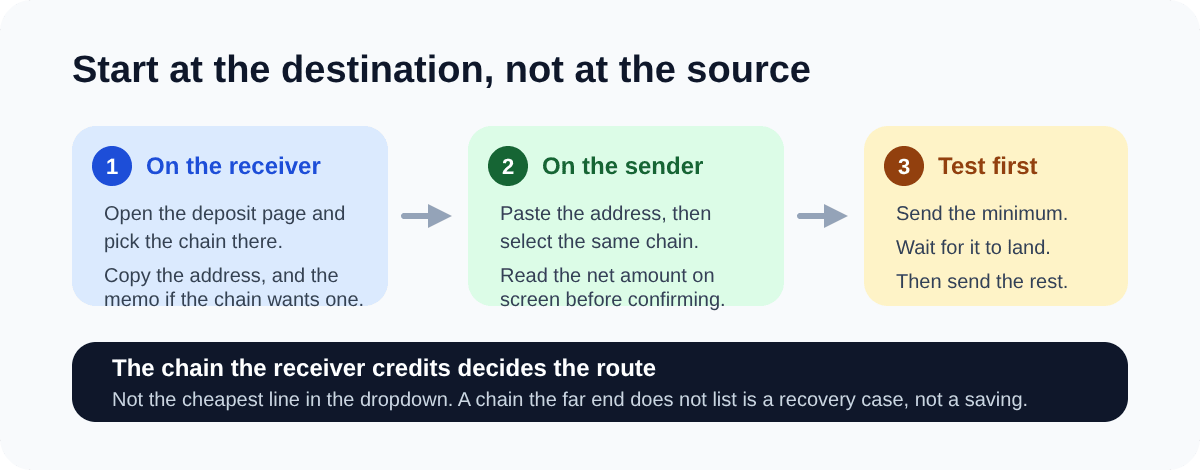
- Start on Bybit, not on Binance. Open the deposit page for USDT and select the chain there. The address you are given belongs to that chain, and the chain shown beside it is the one that governs.
- Copy the address exactly, and the memo too if you chose TON. The memo is not optional and not a label for your own reference.
- On Binance, open a USDT withdrawal, paste the address, then select the same network. Binance offers the networks that fit the address format you pasted. That is not the same as the networks the destination credits.
- Enter the amount and read the net figure before committing. Binance documents that you see it: "Enter the withdrawal amount, and you will see the corresponding transaction fee and the final amount you will receive." That number is live and specific to your account, which makes it worth more than any published table, this one included.
- Read the network confirmation step rather than clicking past it. Binance's warning there: "If you select the wrong network, your funds might be lost and will not be able to be recovered."
- Expect a Travel Rule prompt on the Bybit side. Bybit applies it to all crypto deposits and withdrawals, asking whether the funds come from an exchange or a personal wallet, which exchange, the account type and the sender's name. The deposit then shows as pending under preliminary review, which Bybit says may take up to 30 minutes. Nothing has gone wrong at that point.
- Send the minimum first. 3 USDT on BEP20, Arbitrum One or Optimism, 5 USDT elsewhere. Wait for it to land in your Bybit balance, then send the rest. On BEP20 that insurance costs 0.01 USDT, against the recovery terms below.
When it does not arrive
The wrong chain
Bybit's published terms on unsupported deposits are specific. Recovery is best-effort — it states plainly that "100% recovery is not guaranteed." A fixed handling fee of 200 USD comes out of whatever is returned and is non-refundable once charged. Any request for a transaction worth under 500 USD is rejected outright. Bybit puts the review at 3 to 5 working days, and separately asks you to acknowledge a 7 to 14 business day processing timeframe. Deposits on KCC, OEC, Ronin and Cronos are not eligible for any attempt at all.
Those thresholds are stated in US dollars rather than USDT, so treat them as roughly the same thing and do not cut it fine. A 300 USDT mistake never clears the floor and is simply gone. A 600 USDT one comes back as something in the region of 400, if it works.
There is a cheaper path when the asset appears on your Pending Asset page: you withdraw it yourself to an external wallet that supports that chain. Bybit says the handling fee for that varies by asset and shows in the withdrawal window, which means you can only see it from inside the account. The 200 USD manual procedure is what applies when the deposit never appears there.
Binance's guidance points the same way and argues against choosing on price: "DO NOT select the cheapest fee option. Select the one that is compatible with the external platform." That is the right order, and it is why the recommendation at the top of this page is a route Bybit credits that happens to be cheapest, rather than the cheapest thing in the dropdown.
A blank memo on TON
One of the fourteen shared chains needs a memo, and Bybit names it: "For coin deposits that require a deposit tag/memo, such as XRP, EOS, TON chain and more, kindly be sure to fill in your deposit memo/tag correctly."
The mechanism explains why a blank memo is worse than any other slip. On memo chains, every Bybit account shares one deposit address. The address identifies Bybit; the memo identifies you. Send without it and the money arrives somewhere real, with nothing attached to say it is yours.
There is a trap here for careful readers. Binance's own help article on tags and memos names BNB, XEM, XLM, XRP, KAVA, ATOM, BAND and EOS — TON is not on that list, while Binance's network data flags TON USDT as memo-required. Following the help article alone would tell you no memo is needed.
Recovery, where offered, costs five times the coin's standard withdrawal fee, is not processed for anything older than 90 days, and asks for a transaction hash, a video screen recording made on two devices, an identification document and a selfie, and a fresh deposit of at least 20% of the lost amount sent correctly this time. Bybit states there is "no 100% guarantee to recover your deposit", and the coins it names as eligible for that appeal do not include USDT, so do not assume the form covers you. The cheap defence is to route around it: thirteen of the fourteen chains need no memo, and the cheapest is one of the thirteen.
Holds that look like losses
Not everything slow is broken, and the fix depends on which of three things is true: the withdrawal never left Binance, it is on the chain and not yet credited, or it went somewhere Bybit does not support. Take the transaction ID from Binance's withdrawal history and look it up on that chain's explorer. No transaction means the problem is on the Binance side and nothing on Bybit will help. A confirmed one means the funds are Bybit's problem, not the chain's.
Two ordinary things on Bybit's side look like a loss from outside. The Travel Rule review above is one. The other is Bybit's daily deposit credit limit, set per chain: deposits beyond it sit as non-tradable pending assets rather than spendable balance, and the allowance refreshes at midnight UTC. Bybit does not publish those limits — they appear in the Important Note section of the deposit screen — so read that note before sending a large balance rather than after.
If the withdrawal never left Binance and no security hold explains it, the chain is not your problem: funds moving between exchanges are exactly the pattern compliance systems watch, and the reasons an exchange puts a hold on an account are better read before you need them.
Why these numbers will drift
Binance's own archive is the proof. An announcement from February 2021 set USDT withdrawals on Tron to 0.2 USDT and lowered BEP20 to 0.1. Today those figures are 1.5 and 0.01 — one 7.5 times higher, the other ten times lower. Tron cost twice what BEP20 did then. It costs a hundred and fifty times as much now.
Two more things no table can hold. Which Binance entity your account sits under changes the schedule: Binance.US runs its own dynamic withdrawal fee model, separate from binance.com, and Binance serves per-region fee pages. And both tables above were read from one location on one day, so region and tier are variables here rather than constants.
So read the live figures rather than trusting these. Binance publishes its schedule at binance.com/en/fee/cryptoFee, and the figure that actually governs is on the withdrawal screen, which shows the fee and the net amount for your account before you confirm. Bybit's chain list, minimums and confirmation counts are on its Crypto Deposit/Withdrawal Status page, which timestamps itself. Where a figure here disagrees with either screen, the screen is right.
One last question the fee table cannot answer: whether Bybit should be holding the USDT at all. If it is going there to trade, fine. If it is going there to sit for months, an exchange is a custodian nobody chose deliberately, and moving it onto a device you control takes the counterparty out of the picture. That costs another withdrawal fee — a Bybit one, which is in no table on this page and wants reading on Bybit's own schedule before you plan around it.
Related
View category
Binance and Bybit: What to Check Before You Deposit
How to decide between two crypto exchanges instead of being told which one wins: five questions to answer before you register, the fee lines a headline rate hides, the order to learn futures in, and why your own verified account is the last check.
Read article →
What Is a Stablecoin? USDT vs USDC, and What Holds the Dollar Peg
A stablecoin is a company’s promise to pay one dollar per token, kept at a dollar by traders who can redeem with the issuer and arbitrage the market back. USDT and USDC compared on reserves, redemption, freezing, European and US rules and networks; the two days each broke the peg, as the exchanges printed them; and which coin the exchanger market actually takes.
Read article →
Bybit Master Traders After a Blow-up: What the Board Drops, and What It Keeps
We matched two complete readings of the Bybit copy-trading board twelve days apart to see what happens to a master trader who loses everything. The silent are removed; the wiped stay listed with their followers - until the ninety-day window cleans the card.
Read article →